MEPCO Official Logo
MEPCOBILL Online Portal
Official PITC Live Portal Sync

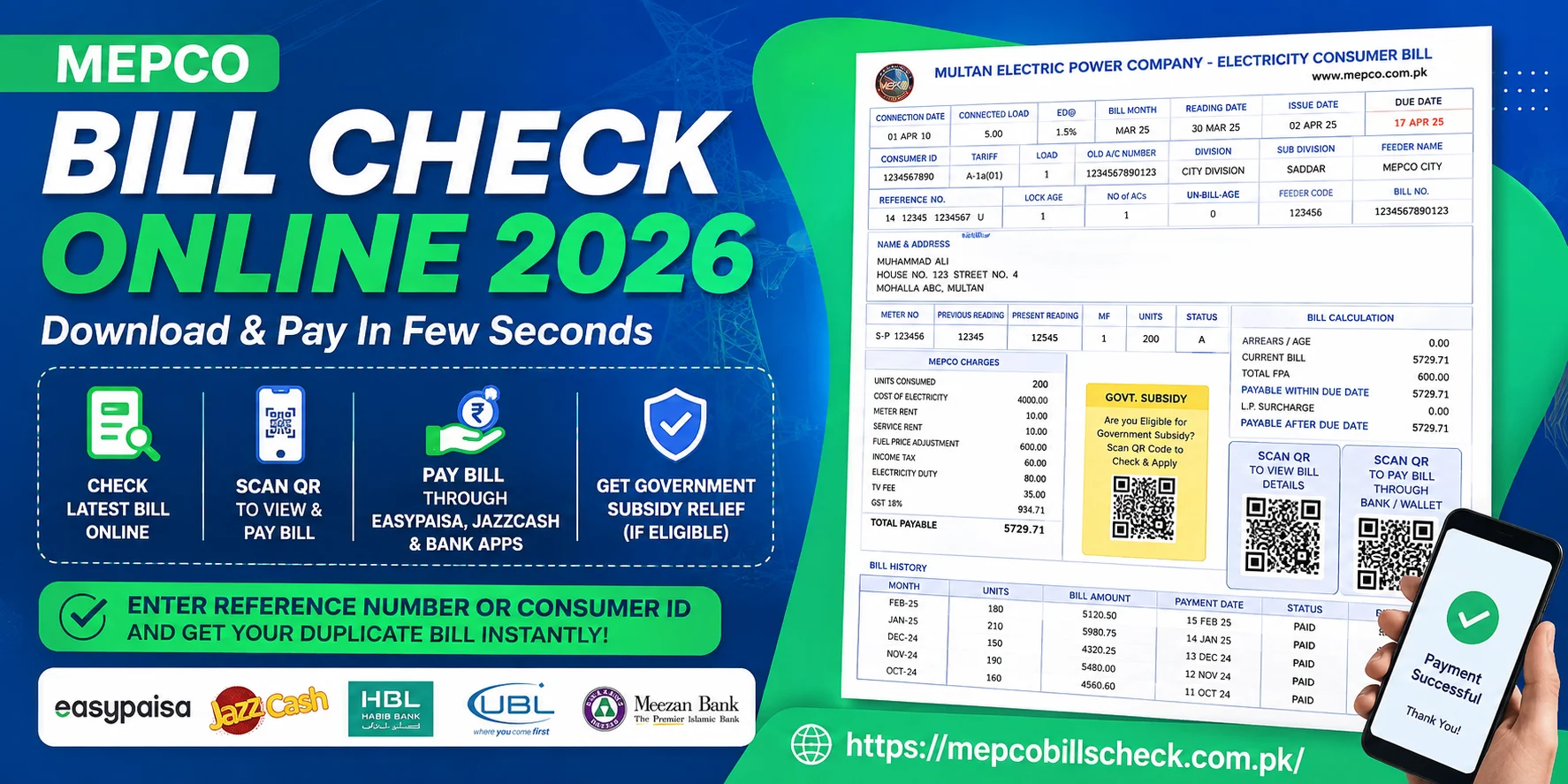
Mepco Bill Check Online 2026 - Download & Pay In Few Seconds (Sep)

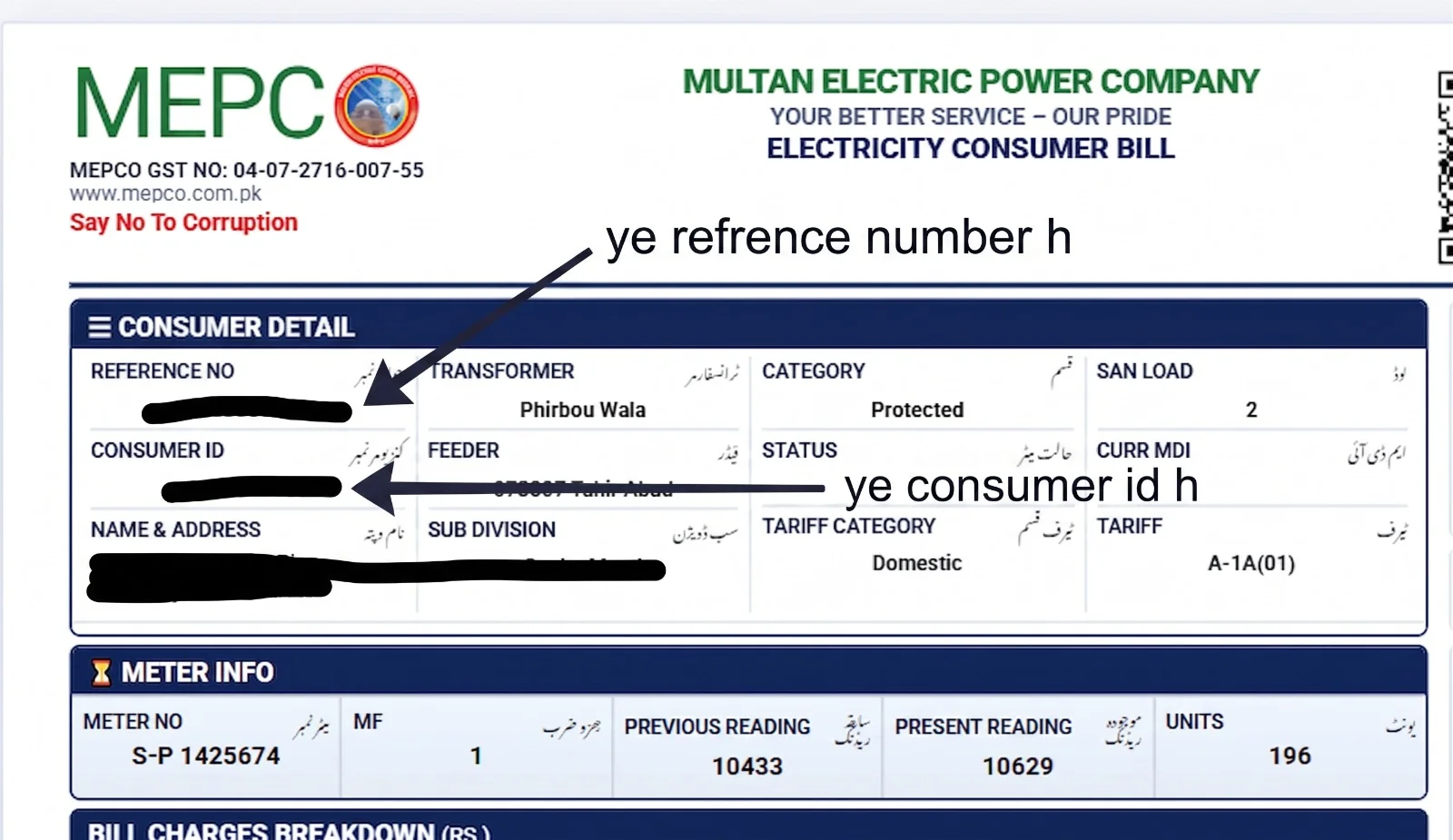
If you also live in Multan, Rahim Yar Khan, Bahawalpur, D.G. Khan, Lodhran, Sahiwal, or their nearby towns and areas, and you want to check and pay your home's MEPCO bill online, then you've come to the right place. Now you can simply scan a QR code to instantly pay and check your bill, and you can also apply for the subsidy program to get significant relief on your bills, provided you are eligible and fall into a protected category. Additionally, you just need to enter your 14-digit reference number or 10-digit consumer ID in the toolbox provided and click the search option below.

As soon as you click, you'll be taken directly to the official site, where your latest duplicate bill will appear on the screen for you to download or print. Additionally, you can now pay your MEPCO bill online through EasyPaisa, JazzCash, or any bank's app. All the detailed steps are provided here for you to explore.

0 / 14 Digits

Top-left corner box marked REFERENCE NO on any old bill copy.

Mepco Bill
Estimate Charges

MEPCO Electricity Bill Calculator

Calculate your upcoming bill based on current NEPRA unit tariff slabs.

Calculated Breakdown
Base Cost of Electricity: Rs. 0
Fuel Price Adjustment (FPA): Rs. 0
Government Taxes & Duty: Rs. 0
Estimated Total Bill: Rs. 0
*Note: Estimated calculation based on general NEPRA tariffs. Actual bill includes meter rent and local TV fee.
Save Electricity Cost

MEPCO Peak Electricity Hours

Avoid high unit rates by minimizing heavy appliance usage during peak hours.

☀️ Summer Season Apr to Oct

07:00 PM – 11:00 PM

Daily 4-hour window with peak unit pricing.

❄️ Winter Season Nov to Mar

05:00 PM – 09:00 PM

Daily 4-hour window with peak unit pricing.

How To Check Your MEPCO Bill Online

Checking the MEPCO bill online has become extremely easy. You just need to enter your 14-digit reference number or 10-digit customer ID, and your latest bill will appear. On our website, it is clearly explained that if there is any issue with the ref. No or consumer ID, an error message will appear, which you can fix without any difficulty.

How to Check MEPCO Bill Using Reference Number

  1. Open the MEPCO bill check tool located above.
  2. Enter your unique 14-digit reference number in the box.
  3. Make sure there is no space between the final letters of the digits (e.g., U or R).
  4. Click the “Check Bill” button below.
  5. Your duplicate bill will appear on the screen, which you can save or print.

How to Check Your MEPCO Bill with Customer ID

  1. First, go to the bill search toolbox provided on our site.
  2. Type your 10-digit Customer ID number into the provided box.
  3. Once you've checked that no digit is incorrect, click the search option.
  4. In just a few seconds, your latest bill will appear on the screen for you to view.
Mepco Bill Check

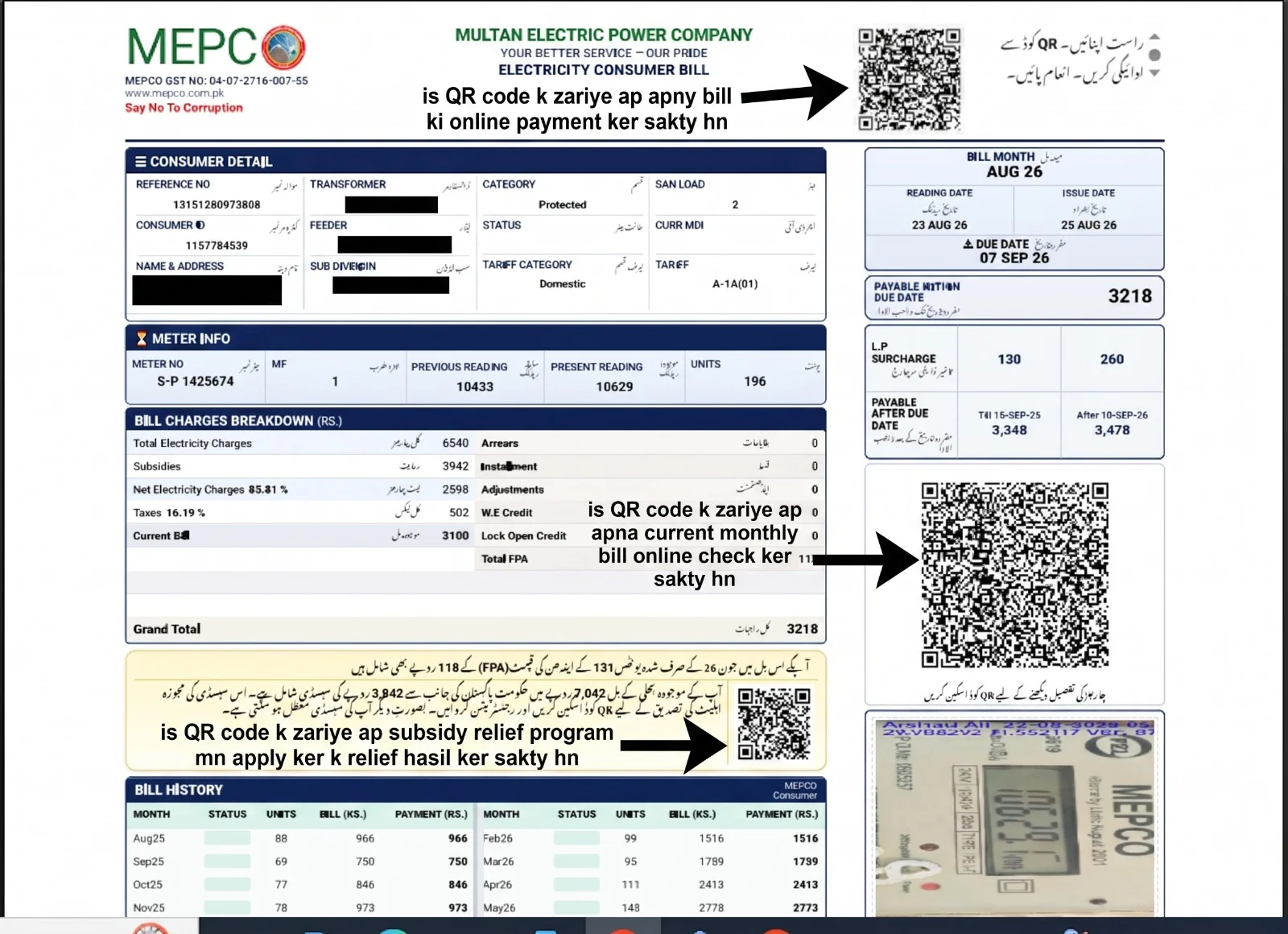
How to Check Your Latest Bill Online Using a QR Code

You can check your brand-new duplicate bill using the large QR code at the bottom right of the bill:

  1. Look at the very bottom right side of your physical electricity bill, where it says “Scan QR to View Bill Details.”
  2. Open your mobile phone's camera or any scanning app and point it at the QR code.
  3. As soon as the code is scanned, the official billing portal link will open on your mobile device.
  4. Click the link, and your complete digital bill for this month will appear on the screen.

How to Pay Your Bill Online Using a QR Code

The QR code in the top-right corner of the bill is designed to make online payments easy:

  1. Scan the QR code located in the top-right corner of your bill with your mobile phone.
  2. This code will take you directly to the online payment gateway or banking options.
  3. You can directly scan it using the scan-and-pay feature of your JazzCash, EasyPaisa, or digital bank account.
  4. The total bill amount will automatically appear in your wallet, from where you can pay your bill with a single click.

How to Apply for the Government Subsidy Relief Program

You can apply for the government's relief scheme using the QR code inside the small yellow box in the center of the bill:

  1. Find the yellow box located in the middle of your bill, where the subsidy details are written.
  2. Scan the small QR code inside this yellow box with your mobile camera.
  3. After scanning, you will be directed to the government's official subsidy verification and registration portal.
  4. If you fall into a protected category (consumers using fewer units), you can apply online for relief from there.
Mepco Bill Qr Code Scan

MEPCO Regional Offices & Contact Directory

If you notice any error in your billing or want to have a new connection installed, you can contact your nearest division office. Below is a detailed list of all main operation circles and their areas.

MEPCO Operation Circle Regional HQ Location Active Districts Covered Customer Care Code
Multan Circle Khanewal Road, Multan Multan, Lodhran Region 061-9220198
D.G. Khan Circle Main Circle Office, D.G. Khan D.G. Khan, Rajanpur 0800-63726
Sahiwal Circle Main Circle Office, Sahiwal Sahiwal, Pakpattan 040-9200305
Muzaffargarh Circle Main Circle Office, Muzaffargarh Muzaffargarh, Layyah 0800-63726
Bahawalpur Circle Main Circle Office, Bahawalpur Bahawalpur District 062-9250102
Bahawalnagar Circle Main Circle Office, Bahawalnagar Bahawalnagar Area 0800-63726
Khanewal Circle Main Circle Office, Khanewal Khanewal City & Suburbs 065-9200214
R.Y. Khan Circle Main Circle Office, R.Y. Khan Rahim Yar Khan 068-9230158
Vehari Circle Main Circle Office, Vehari Vehari Districts 067-3363209

Check MEPCO Bill Paid Status Online (2026)

After paying your electricity bill, the biggest worry is whether your record has been updated or not. But today's modern era has eliminated that concern for you as well. If you want to check the paid status of your MEPCO bill, the details are provided below.

  1. Enter your 14-digit reference number in the search bar on our website.
  2. Click on “View Full Bill.”
  3. Check the payment history at the bottom.
  4. If the payment date and amount for the previous month are listed, your bill is paid.

Check Old or Previous MEPCO Bills

If you want to view your old bills and see how many units of electricity you used in each month, the MEPCO online system provides you with complete data in detail.

Mepco bill history check online

On Mepco's online portal, you can easily view your bill history. When you enter your reference number on the link we provided and view the entire bill. You will see a column below showing the bill amount and unit usage for each month. You can easily check it.

  • Power consumption: How many units were used
  • Bill amount: How much was the bill, and which month had the highest usage?
  • Payment date: On what date was the bill paid
  • Payment status: Has that bill been paid or not

MEPCO Bill Charges Detail

The Mepco bill contains various details and charges, which let you know the total bill amount and how it's calculated. On our site, we have clearly explained the details of the bill, GST, and the fixed charges included in it.

MEPCO Bill Charges

Did you know that a Mepco bill typically includes three types of charges, which we have listed below?

  1. Energy Charges: based on the units you consume.
  2. Fixed Charges: This means that whether you use electricity or not, you have to pay these fixed charges every month. They are the fees for maintaining the service.
  3. Taxes and Surcharges: FPA, GST, and TV fee, etc.

GST on MEPCO Bill

All bills must include GST (General Sales Tax). It is often subject to change in accordance with the government's new laws and regulations. In Pakistan, the rate is currently 18%; it was 17% in 2023. Its percentage is written on every bill.

FAQs About Mepco Bill Check

Conclusion

Now, checking your MEPCO bill online has become very easy. You can check your latest monthly bill in minutes, not only with a reference number but also by scanning a QR code. You can also print and download it.

We have provided you with real information that is verified by official sources, but we are not an actual site. Here, things have been simplified for your help and convenience. The bill checkbox provided above is the exact one from the main website. It is completely genuine. As soon as you check your bill, you will be taken directly to that official platform. If you have any questions, you can ask in the comment box below, and we will do our best to guide you correctly.